
How to embed ticket sales in your website
On this page
Show your public ticket form directly in your website. Changes to the saved form are reflected in the embedded version.
What you need
A saved public form and permission to insert custom HTML on your website. Some website builders require a paid plan. If custom HTML is unavailable, use a button linking to the standalone form.
Prepare your HTML code
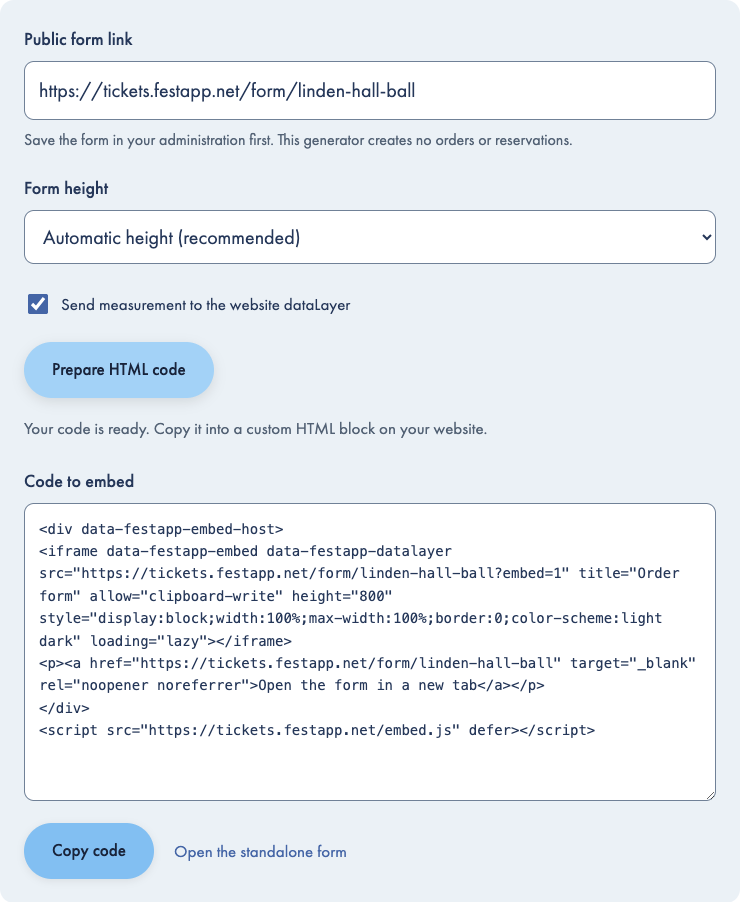
In the administration, open your saved form through Forms → Settings → Embed on your website, or paste its public link into the generator below. The generator prepares code; it does not create an order or reserve tickets. Copy the saved public link from your event's Forms.Open forms in the app
Measurement sends events to your website’s dataLayer; its GTM and consent manager control consent. The website domain must be approved in measurement settings. Turn this option off to use the GTM configured in Festapp. Conversion events also share email, phone and transaction identifiers with website scripts. Review your tags and privacy notice. Unit mode requires a consent-manager adapter.
Insert the code in your website
Add a custom HTML block
Open the page in your website editor and add a block that accepts HTML. For a website-builder example, follow the Webnode guide.
Paste the complete code
Keep the iframe, fallback link and helper script together in both height modes. Save and publish the page.
Check the published page
Editors may show only a placeholder. Check the actual published page on desktop and mobile. Continue to the order summary to verify that a longer form stays visible.
Automatic or fixed height
Automatic height uses the helper script to adjust to the form content. Fixed height keeps a set frame height; the helper script still supplies website appearance. If your website removes scripts, use fixed height and check that visitors can reach every field and the submit button. Website appearance cannot be inherited without the script.
Match your website
One saved form setting in Festapp Tickets controls every embed. Open the form’s Design, set Match website appearance and save the form. Enabled uses the available host font, background and colors; disabled keeps the form appearance. Embeds apply the saved choice on subsequent page loads without replacing embed code. The seating plan keeps its own appearance. An active checkout is not restarted.
Use a direct link instead
Add a button labelled Buy tickets and set its link to the public form URL.
Where orders and payments go
Orders remain in our application. Use the order guide to find a purchase, and payment settings to check the receiving account and instructions.Open orders in the app
Form measurement
Website mode sends events to your website dataLayer; Unit mode uses the organizer's isolated container. Follow the form measurement guide for consent, the paused GTM preset and conversion checks.